2021年7月14日 星期三

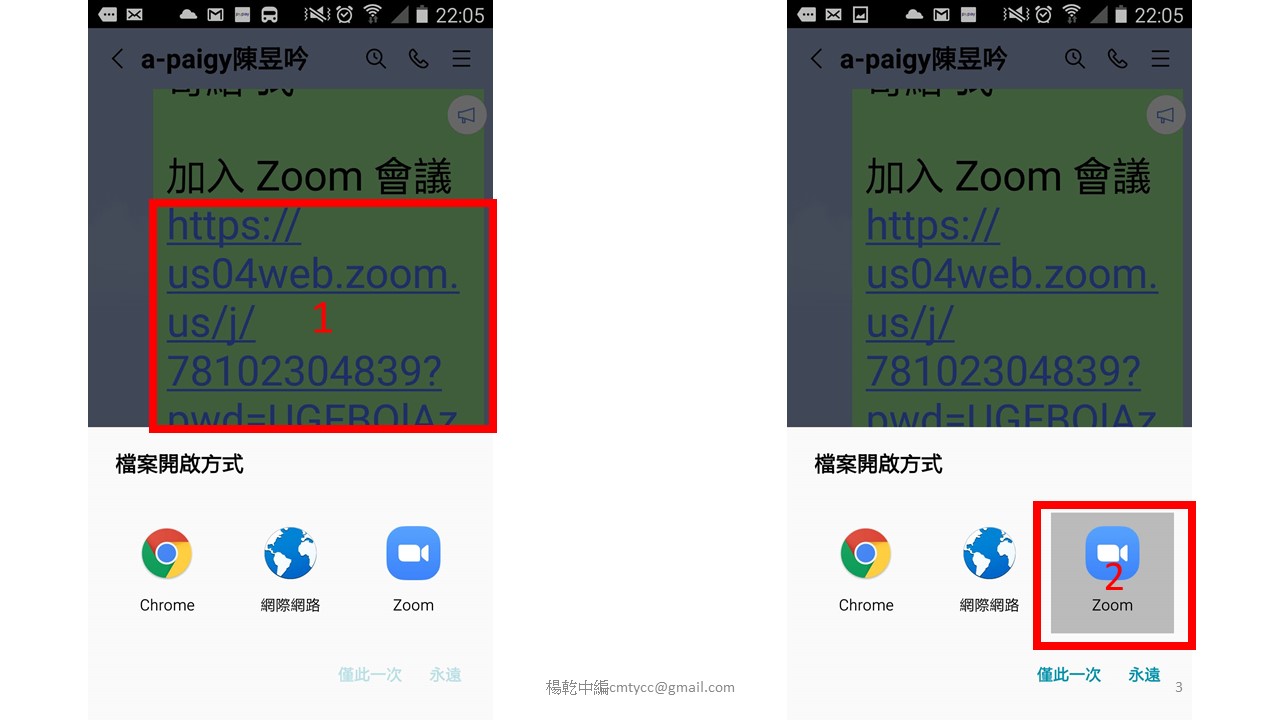
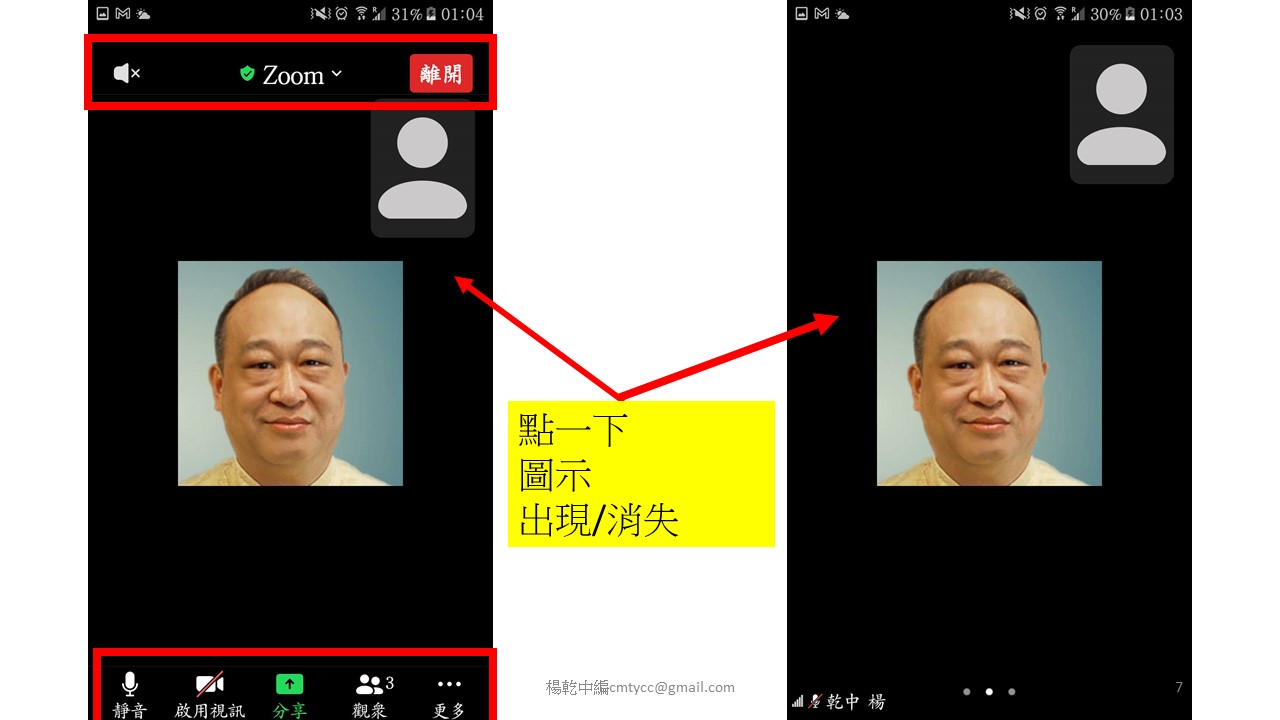
p04-使用者(與會者)使用電腦版Zoom的說明與示範教學--讓您能快速順利開會與上課

▶▶▶▶▶▶▶▶相關單元

▶▶▶▶電腦版

▶p01-電腦版ZOOM如何下載軟體並安裝

教學影片 https://www.youtube.com/watch?v=KDx8Tm4f1gU

投影片   https://yangwc.blogspot.com/2020/03/zoom.html


▶p02-電腦版ZOOM 註冊-ZOOM如何免費申請-主持最多 100 名參與者的會議

教學影片 https://www.youtube.com/watch?v=Rje6MbzXqsg

投影片   https://yangwc.blogspot.com/2020/03/zoom-100.html

▶p03-zoom電腦版如何登入與登出

教學影片 https://www.youtube.com/watch?v=wwXJny4yeV0

投影片   https://yangwc.blogspot.com/2020/03/zoom_29.html

▶p04-使用者(與會者)使用電腦版Zoom的說明與示範教學--讓您能快速順利開會與上課

教學影片 https://youtu.be/IZ2iawNwcN8

投影片   https://yangwc.blogspot.com/2021/07/p04-zoom.html


▶▶▶▶▶▶▶▶相關單元

▶▶▶▶電腦版

p01-電腦版ZOOM如何下載軟體並安裝

教學影片 https://youtu.be/KDx8Tm4f1gU

投影片   https://yangwc.blogspot.com/2020/03/zoom.html

p02-電腦版ZOOM 註冊-ZOOM如何免費申請-主持最多 100 名參與者的會議

教學影片 https://youtu.be/Rje6MbzXqsg

投影片 https://yangwc.blogspot.com/2020/03/zoom-100.html

p03-zoom電腦版如何登入與登出

教學影片 https://youtu.be/wwXJny4yeV0

投影片   https://yangwc.blogspot.com/2020/03/zoom_29.html

p04-使用者(與會者)使用電腦版Zoom的說明與示範教學--讓您能快速順利開會與上課

教學影片  https://youtu.be/IZ2iawNwcN8

投影片    https://yangwc.blogspot.com/2021/07/p04-zoom.html

▶p05-(用電腦)zoom主持人如何設定個人會議ID的密碼並召開會議

教學影片 https://youtu.be/6QxVmnKoI2A

投影片   https://yangwc.blogspot.com/2020/04/zoomid.html

▶▶▶▶Zoom 手機版基本操作

教學影片 https://youtu.be/gKXS0T0g1Bs

投影片   https://yangwc.blogspot.com/2021/07/zoom_38.html


▶▶▶▶iPhone手機版

▶a01-Apple手機-ZOOM如何下載APP並啟用

教學影片  https://www.youtube.com/watch?v=gbMObxCrcyA

投影片     https://yangwc.blogspot.com/2020/03/applezoomapp.html

a02-Apple手機下載ZOOM APP後如何註冊(Iphone手機用zoom app 註冊)

教學影片  https://www.youtube.com/watch?v=rNjlYigLCQQ

投影片     https://yangwc.blogspot.com/2020/03/applezoom-appiphonezoom-app.html


a03-APPLE手機iPhone-zoom 如何登入與登出

教學影片   https://youtu.be/h2SJDFVMyBk

投影片     https://yangwc.blogspot.com/2020/04/iphone-zoom.html


▶▶▶▶ Android手機版

m01-Android手機-ZOOM如何下載APP並啟用

教學影片  https://youtu.be/cYoNGP2JCOI

投影片    https://yangwc.blogspot.com/2020/03/zoomappandroid.html

 m02-Android手機下載ZOOM APP後如何註冊

教學影片 https://youtu.be/tuLJdG0L77I

投影片   https://yangwc.blogspot.com/2020/03/androidzoom-app.html

 m03-Android手機-zoom如何登入與登出

教學影片 https://youtu.be/bhG97hVJ-MU

投影片   https://yangwc.blogspot.com/2020/03/android-zoom.html

▶▶▶▶▶▶▶▶活動資訊

政府共好計畫

提供九人以下小微企業 以書面方式申請

免費5個月叡揚雲端服務;活動至7/31號止

說明會報名連結如下:

https://reurl.cc/0jQ1gb

臺灣雲市集 TCloud 計畫

最高可獲政府補助點數 30,000 

 = 新臺幣 1 

叡揚雲端方案連結

https://reurl.cc/a9RVvQ

線上講座_找對雲端工具包,打造營運新活水

叡揚資訊 雲端及巨資事業群

賴俊仁 處長

https://reurl.cc/AkpA7Z

7/29精準行銷-免費線上研討會

吳秀倫 智策慧品牌顧問 董事總經理

楊東城 叡揚資訊 雲端及巨資事業群 處長

歡迎報名連結:

https://reurl.cc/VE78yy


標籤:

上網開會,網路學習,teams,elearning,hangouts meet,zoom,線上會議,webex,線上學習,視訊會議,視訊開會


2021年6月27日 星期日

(嵌入)手機Google Meet操作(另一款界面)


Google Meet 手機版教學

https://www.youtube.com/watch?v=SP1U6TTGgF0


手機Google Meet操作(另一款界面)

https://youtu.be/wzEItWWXsmY


Google Meet電腦版(個人版)基本操作-1

(電腦版基本使用看此即可)

https://www.youtube.com/watch?v=VFogj35VLGc

Google Meet電腦版(個人版)基本操作-2

https://youtu.be/YNd0YqmiA-Y


新版Google Meet 問01-分享簡報如何能同步(老師、演講者必須知道)


▶▶▶▶▶▶▶▶相關單元

▶▶▶▶電腦版

▶Google Meet電腦版(個人版)基本操作-1

教學影片 https://youtu.be/VFogj35VLGc

投影片   https://yangwc.blogspot.com/2021/06/google-meet-1.html


▶Google Meet電腦版(個人版)基本操作-2

教學影片 https://youtu.be/YNd0YqmiA-Y

投影片   https://yangwc.blogspot.com/2021/06/google-meet_99.html

▶新版Google Meet 問01-分享簡報如何能同步(老師、演講者必須知道)

教學影片 https://youtu.be/p--EBciBago

投影片   https://yangwc.blogspot.com/2021/07/google-meet-01_17.html

▶新版 Google meet問02-Meet免費版或被主持人設為無錄製功能,是否有方法錄製Meet來複習

教學影片 https://youtu.be/bT55HZmjO2w

投影片   https://yangwc.blogspot.com/2021/07/meet02-meetmeet_22.html

▶Google Meet 問03-Meet開會電腦聽到的聲音太小聲,已將喇叭調到最大聲了,還是聽不清楚怎麼辦

教學影片  https://youtu.be/Y81taKaGF1Q

投影片   https://yangwc.blogspot.com/2021/07/google-meet-03-meet.html

▶新版 Google Meet下分享簡報--以教學情境逐步實際影音操作示範-告知簡報同步的技巧與注意事項

教學影片   https://youtu.be/SRaiWXn3u_M

投影片       https://yangwc.blogspot.com/2021/07/meet.html

▶▶▶▶手機版

▶Google Meet手機版基本操作

教學影片 https://youtu.be/SP1U6TTGgF0

投影片   https://yangwc.blogspot.com/2021/06/google-meet_4.html

▶手機Google Meet操作(另一款界面)

教學影片 https://youtu.be/wzEItWWXsmY

投影片   https://yangwc.blogspot.com/2021/06/google-meet_27.html

▶▶▶▶▶▶▶▶活動資訊

▶政府共好計畫

提供九人以下小微企業 以書面方式申請

免費5個月叡揚雲端服務;活動至7/31號止

說明會報名連結如下:

https://reurl.cc/0jQ1gb


▶臺灣雲市集 TCloud 計畫

最高可獲政府補助點數 30,000 點

1 點 = 新臺幣 1 元

叡揚雲端方案連結

https://reurl.cc/a9RVvQ

▶線上講座_找對雲端工具包,打造營運新活水

叡揚資訊 雲端及巨資事業群

賴俊仁 處長

https://reurl.cc/AkpA7Z


▶7/29精準行銷-免費線上研討會

吳秀倫 智策慧品牌顧問 董事總經理

楊東城 叡揚資訊 雲端及巨資事業群 處長

歡迎報名連結:

https://reurl.cc/VE78yy

標籤:

上網開會,網路學習,teams,elearning,hangouts meet,zoom,線上會議,webex,線上學習,視訊會議,視訊開會

Google Meet手機界面(另一版)


▶Google Meet電腦版(個人版)基本操作-1

▶Google Meet電腦版(個人版)基本操作-2

▶Google Meet 手機版教學

▶手機Google Meet操作(另一款界面)


Google Meet 手機版教學

https://www.youtube.com/watch?v=SP1U6TTGgF0


手機Google Meet操作(另一款界面)

https://youtu.be/wzEItWWXsmY


Google Meet電腦版(個人版)基本操作-1

(電腦版基本使用看此即可)

https://www.youtube.com/watch?v=VFogj35VLGc

Google Meet電腦版(個人版)基本操作-2

https://youtu.be/YNd0YqmiA-Y


新版Google Meet 問01-分享簡報如何能同步(老師、演講者必須知道)


▶▶▶▶▶▶▶▶相關單元

▶▶▶▶電腦版

▶Google Meet電腦版(個人版)基本操作-1

教學影片 https://youtu.be/VFogj35VLGc

投影片   https://yangwc.blogspot.com/2021/06/google-meet-1.html


▶Google Meet電腦版(個人版)基本操作-2

教學影片 https://youtu.be/YNd0YqmiA-Y

投影片   https://yangwc.blogspot.com/2021/06/google-meet_99.html

▶新版Google Meet 問01-分享簡報如何能同步(老師、演講者必須知道)

教學影片 https://youtu.be/p--EBciBago

投影片   https://yangwc.blogspot.com/2021/07/google-meet-01_17.html

▶新版 Google meet問02-Meet免費版或被主持人設為無錄製功能,是否有方法錄製Meet來複習

教學影片 https://youtu.be/bT55HZmjO2w

投影片   https://yangwc.blogspot.com/2021/07/meet02-meetmeet_22.html

▶Google Meet 問03-Meet開會電腦聽到的聲音太小聲,已將喇叭調到最大聲了,還是聽不清楚怎麼辦

教學影片  https://youtu.be/Y81taKaGF1Q

投影片   https://yangwc.blogspot.com/2021/07/google-meet-03-meet.html

▶新版 Google Meet下分享簡報--以教學情境逐步實際影音操作示範-告知簡報同步的技巧與注意事項

教學影片   https://youtu.be/SRaiWXn3u_M

投影片       https://yangwc.blogspot.com/2021/07/meet.html

▶▶▶▶手機版

▶Google Meet手機版基本操作

教學影片 https://youtu.be/SP1U6TTGgF0

投影片   https://yangwc.blogspot.com/2021/06/google-meet_4.html

▶手機Google Meet操作(另一款界面)

教學影片 https://youtu.be/wzEItWWXsmY

投影片   https://yangwc.blogspot.com/2021/06/google-meet_27.html

▶▶▶▶▶▶▶▶活動資訊

▶政府共好計畫

提供九人以下小微企業 以書面方式申請

免費5個月叡揚雲端服務;活動至7/31號止

說明會報名連結如下:

https://reurl.cc/0jQ1gb


▶臺灣雲市集 TCloud 計畫

最高可獲政府補助點數 30,000 點

1 點 = 新臺幣 1 元

叡揚雲端方案連結

https://reurl.cc/a9RVvQ

▶線上講座_找對雲端工具包,打造營運新活水

叡揚資訊 雲端及巨資事業群

賴俊仁 處長

https://reurl.cc/AkpA7Z


▶7/29精準行銷-免費線上研討會

吳秀倫 智策慧品牌顧問 董事總經理

楊東城 叡揚資訊 雲端及巨資事業群 處長

歡迎報名連結:

https://reurl.cc/VE78yy

標籤:

上網開會,網路學習,teams,elearning,hangouts meet,zoom,線上會議,webex,線上學習,視訊會議,視訊開會

生成式 AI 創作應用入門班-即學即用Suno AI,Things,Pixabay,Stocktune,Leonardo AI,Dzine,Ideogram,Raphaelt,Prome,Perplexity,Felo,Gamma,Napkin,Kimi+ ,Felo

    💖麻煩轉給有需要的朋友 🎶✨ 生成式 AI 創作應用入門班 AI 時代創作力全面爆發!從音樂、影像、搜尋到簡報,一次學會四大熱門 AI 工具,讓你的創意不再受限! 即學即用Suno AI,Things,Pixabay,Stocktune,Leonardo AI,Dzi...